What is Google Advanced Search and Why Should SEO Professionals Care?
Posted by
 Stefan Winter
How to Master Google Advanced Search for Better SEO Research in 2026

Are you tired of sifting through countless irrelevant search results when conducting SEO research? Google Advanced Search is your secret weapon for finding exactly what you need, when you need it. This powerful tool transforms how SEO professionals, content creators, and marketers discover competitor insights, identify content gaps, and uncover valuable keyword opportunities. In this comprehensive guide, you'll learn step-by-step how to leverage Google Advanced Search to supercharge your SEO strategy and save hours of research time.
What is Google Advanced Search and Why Should SEO Professionals Care?

Google Advanced Search is a specialized interface that allows users to create highly specific search queries using filters and operators that aren't readily available in the standard search bar. While most people use Google's basic search, this advanced version provides granular control over your search parameters, making it invaluable for SEO research.
For SEO professionals, Google Advanced Search serves as a research powerhouse. It enables you to analyze competitor content, discover link building opportunities, identify trending topics within specific timeframes, and find exact-match keywords that your target audience is searching for. The precision it offers can dramatically improve the quality of your SEO content creation efforts.
According to Google's own documentation, advanced search operators can help users find more relevant results by filtering content based on specific criteria that align with their research goals.
How to Access and Navigate Google Advanced Search
Getting started with Google Advanced Search is straightforward, but knowing where to find it and how to navigate its interface effectively makes all the difference in your research efficiency.
To access Google Advanced Search, visit google.com and perform any basic search. On the results page, click "Settings" in the bottom right corner, then select "Advanced Search" from the dropdown menu. Alternatively, you can go directly to google.com/advanced_search.
The interface is organized into several key sections: "Find pages with" allows you to specify word combinations, "Then narrow your results by" lets you filter by language, region, and file type, and "Terms appearing" helps you target specific areas of web pages like titles or URLs.
Understanding the Core Search Fields
The "Find pages with" section contains four critical fields that form the foundation of advanced searches. "All these words" functions like an AND operator, ensuring every specified term appears on the page. "This exact word or phrase" works like quotation marks in regular search, finding pages with your exact phrase. "Any of these words" operates as an OR function, returning pages containing at least one of your specified terms. "None of these words" excludes pages containing unwanted terms, helping you filter out irrelevant results.
Step-by-Step Guide to Advanced SEO Research Techniques
Now that you understand the interface, let's dive into specific techniques that will transform your SEO research process. These methods will help you uncover insights that your competitors might be missing.
Start by identifying content gaps in your niche. Use the "all these words" field to enter your target keywords, then use the "none of these words" field to exclude your own domain. This reveals what content exists in your space without showing your own pages. For example, if you're researching "email marketing," enter that in the first field and "-site:yourdomain.com" to see competitor content.
Next, leverage the site-specific search function to analyze competitor strategies. Enter a competitor's domain in the "site or domain" field, then add your target keywords in the "all these words" field. This shows you exactly what content they've created around specific topics, helping you identify successful content formats and potential gaps in their strategy.
Advanced Operator Combinations for Keyword Research
Combining multiple operators creates powerful research queries that surface unique insights. Use the "Terms appearing" dropdown to search for keywords specifically in page titles by selecting "in the title of the page." This technique helps you understand how competitors are optimizing their title tags for specific keywords.
The file type filter proves invaluable for finding downloadable resources like PDFs, presentations, and spreadsheets in your industry. Set the file type to "PDF" and enter industry-specific terms to discover whitepapers, case studies, and research reports that could inspire your content marketing strategy.
Essential Advanced Search Operators Every SEO Should Master

While the visual interface provides excellent functionality, understanding key search operators allows you to work more efficiently and create more complex queries. These operators can be used directly in Google's main search bar or combined with the advanced search interface.
| Operator | Function | Example | SEO Use Case |
|---|---|---|---|
| site: | Search within specific domain | site:reddit.com SEO tips | Find discussions about your topics |
| intitle: | Search in page titles | intitle:"keyword research" | Analyze title optimization |
| inurl: | Search in URLs | inurl:blog marketing | Find blog content on topics |
| filetype: | Find specific file types | filetype:pdf SEO guide | Discover downloadable resources |
| related: | Find similar websites | related:moz.com | Identify competitors |
Time-based filtering using the "last update" dropdown helps you find fresh content opportunities. Set it to "past year" when researching trending topics, or use "custom range" to analyze how coverage of specific topics has evolved over time.
How to Use Advanced Search for Competitive Analysis
Competitive analysis through Google Advanced Search provides insights that expensive SEO tools sometimes miss. This approach gives you a direct view of what's actually ranking and performing in search results.
Begin by creating a comprehensive competitor content audit. Enter each competitor's domain using the site operator, then systematically search for your target keywords. Document the types of content they're creating, their posting frequency, and the topics they're covering most thoroughly. This process reveals content gaps you can exploit and successful formats you should consider adopting.
Use the "Terms appearing" filter to analyze how competitors structure their content. Search for your keywords "in the title of the page" to understand their title tag strategies, then switch to "in the text of the page" to see how they're incorporating keywords naturally throughout their content.
Finding Link Building Opportunities
Advanced search excels at uncovering link building prospects that others might overlook. Use queries like "keyword" + "write for us" or "keyword" + "guest post" to find websites accepting contributions in your niche. The ability to filter by date ensures you're finding currently active opportunities rather than outdated listings.
Search for resource pages by combining your keywords with terms like "resources," "links," or "tools." These pages often provide excellent link building opportunities if you have relevant, high-quality content to offer.
Advanced Techniques for Content Research and Planning
Content planning becomes more strategic when you can precisely identify what topics are underserved or trending in your industry. Google Advanced Search provides the granular control needed for this level of research.
Create content calendars based on seasonal trends by using date ranges to analyze when specific topics gain traction. Search for your target keywords with custom date ranges covering the past few years to identify recurring patterns and optimal timing for different content types.
The language and region filters help you understand local search behavior and identify opportunities for location-specific content. This proves especially valuable for businesses targeting multiple geographic markets or looking to expand internationally.
When developing your SEO content strategy, use advanced search to analyze the content formats that perform best for specific keywords. Filter results by file type to see whether infographics (images), videos, or text-based content dominates the search landscape for your target terms.
How Can Advanced Search Improve Your Keyword Research Process?
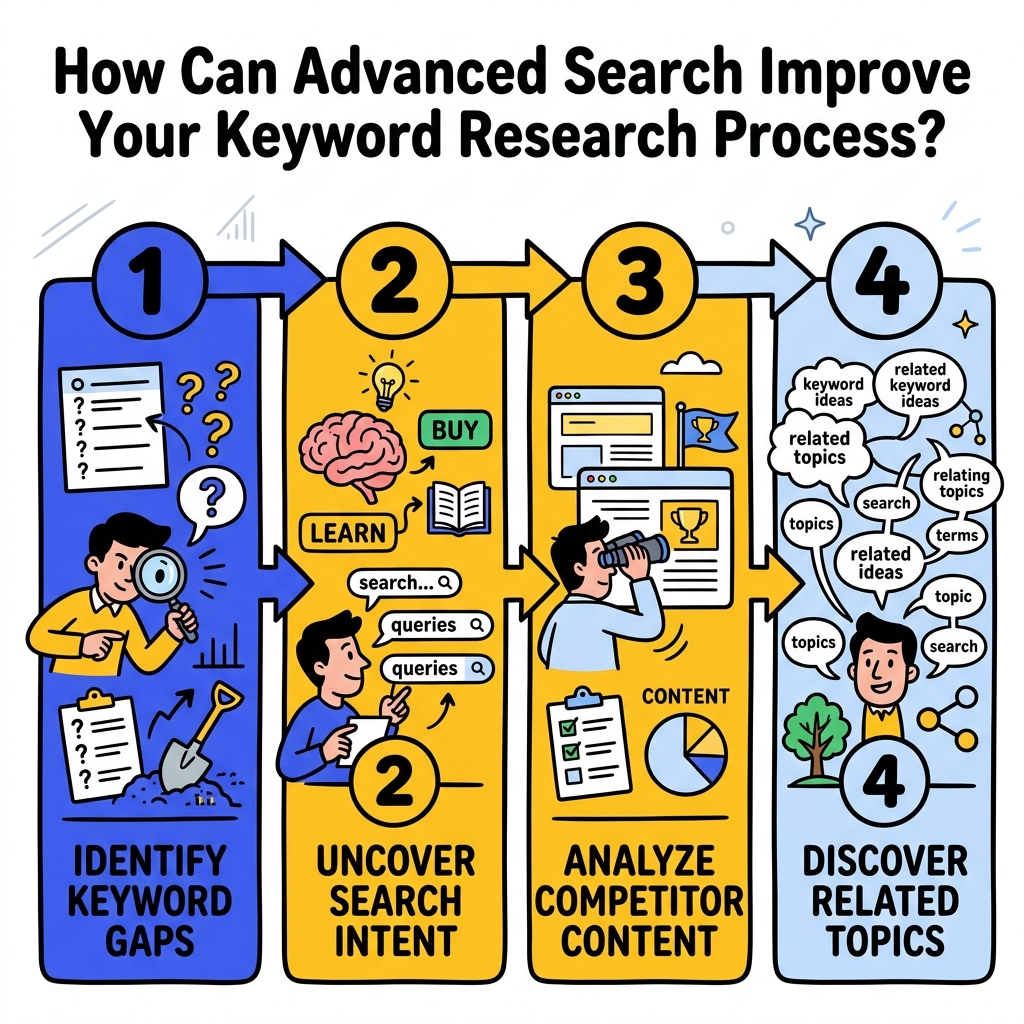
Traditional keyword research tools provide valuable data, but Google Advanced Search offers context and real-world application insights that complement numerical metrics. This approach helps you understand not just what people search for, but how they interact with the results.
Use the exact phrase search to identify long-tail keyword variations that tools might miss. Search for your main keyword as an exact phrase, then analyze the related searches and autocomplete suggestions that appear. This reveals natural language patterns your audience uses when searching for your topics.
The "any of these words" function helps you understand keyword relationships and semantic connections. Enter several related terms to see how they overlap in search results, providing insights into topic clustering and content organization strategies.
According to research from Search Engine Journal, advanced search operators remain one of the most underutilized yet powerful tools for SEO professionals seeking competitive advantages.
Troubleshooting Common Advanced Search Challenges
Even experienced users encounter obstacles when working with Google Advanced Search. Understanding common issues and their solutions ensures your research remains efficient and productive.
One frequent challenge involves overly restrictive queries that return no results. When this happens, gradually remove filters starting with the most specific ones. Begin by removing date restrictions, then file type limitations, and finally some keyword requirements until you achieve a manageable result set.
Another common issue is duplicate or near-duplicate results cluttering your research. Use the "none of these words" field strategically to exclude domains or terms that consistently produce irrelevant results. For example, if you're researching B2B topics but keep getting consumer-focused results, exclude terms like "personal" or "individual."
Conclusion
Google Advanced Search transforms SEO research from a time-consuming guessing game into a precise, strategic process. By mastering these techniques, you'll uncover competitor insights, identify content opportunities, and develop more effective keyword strategies that drive real results. The combination of visual filters and advanced operators gives you unprecedented control over your search queries, enabling research depth that basic searches simply cannot match.
Ready to revolutionize your SEO research process? Start implementing these Google Advanced Search techniques today, and watch as your content strategy becomes more targeted, your competitive analysis more thorough, and your keyword research more effective than ever before.

Stefan Winter
Founder & SEO Expert
Founder of Fast SEO Fix and SEO automation expert. Stefan built Fast SEO Fix to solve the tedious problem of manual SEO work. He specializes in SEO optimized content generation, keyword research, and automated SEO strategies.
