What Makes Documentation "Broken" and Why It Hurts Your Rankings?
Posted by
 Stefan Winter
How to Fix Documentation Issues That Kill Your SEO Performance in 2026
Poor documentation can silently sabotage your website's search rankings, user experience, and conversion rates. Whether you're dealing with outdated product guides, broken internal links, or confusing help sections, documentation problems create friction that drives visitors away and signals quality issues to search engines. In this comprehensive guide, you'll learn proven strategies to identify, repair, and optimize your documentation for both users and SEO success.
What Makes Documentation "Broken" and Why It Hurts Your Rankings?
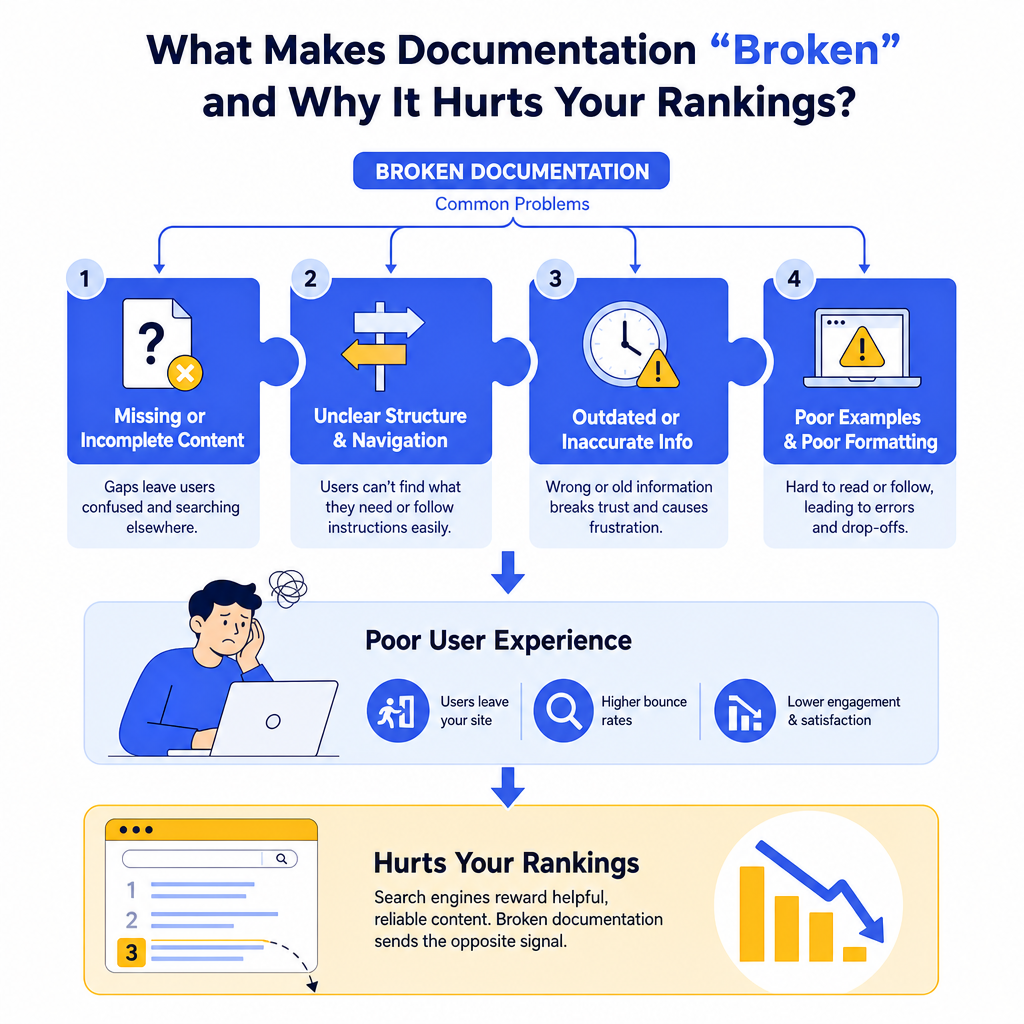
Documentation becomes problematic when it fails to serve its primary purpose: helping users accomplish their goals quickly and efficiently. Search engines like Google prioritize websites that provide exceptional user experiences, and broken documentation directly undermines this objective.
Common documentation issues include outdated screenshots, dead links, missing steps in processes, inconsistent formatting, and information that no longer matches current product features. These problems create user frustration, increase bounce rates, and reduce the time visitors spend on your site. When users can't find the answers they need, they return to search results to find better resources elsewhere.
Search engines track these behavioral signals and use them as ranking factors. High bounce rates and low dwell time indicate that your content isn't meeting user needs, which can negatively impact your search visibility. Additionally, broken internal links within documentation create crawling issues that prevent search engines from properly indexing your content.
How to Conduct a Comprehensive Documentation Audit
Before you can fix documentation problems, you need to identify exactly what's broken. Start by creating an inventory of all your documentation pages, including help articles, user guides, FAQ sections, and product manuals. Use tools like Screaming Frog or Google Search Console to crawl your documentation and identify technical issues.
Pay special attention to pages with high exit rates in Google Analytics, as these often indicate content that isn't meeting user expectations. Look for patterns in user behavior data, such as pages where visitors frequently use the search function or contact support immediately after viewing.
Create a spreadsheet to track each documentation page's status, including metrics like page views, bounce rate, average time on page, and conversion rate. This data will help you prioritize which documentation needs immediate attention. Focus first on high-traffic pages with poor performance metrics, as fixing these will have the greatest impact on your overall SEO performance.
What Tools Should You Use for Documentation Analysis?
| Tool Category | Recommended Tools | Primary Use Case |
|---|---|---|
| Technical SEO | Screaming Frog, Ahrefs Site Audit | Identify broken links, crawl errors |
| User Behavior | Google Analytics, Hotjar | Track engagement metrics, user paths |
| Content Quality | Grammarly, Hemingway Editor | Improve readability, fix errors |
| Search Performance | Google Search Console | Monitor rankings, click-through rates |
How to Fix Broken Links and Navigation Issues
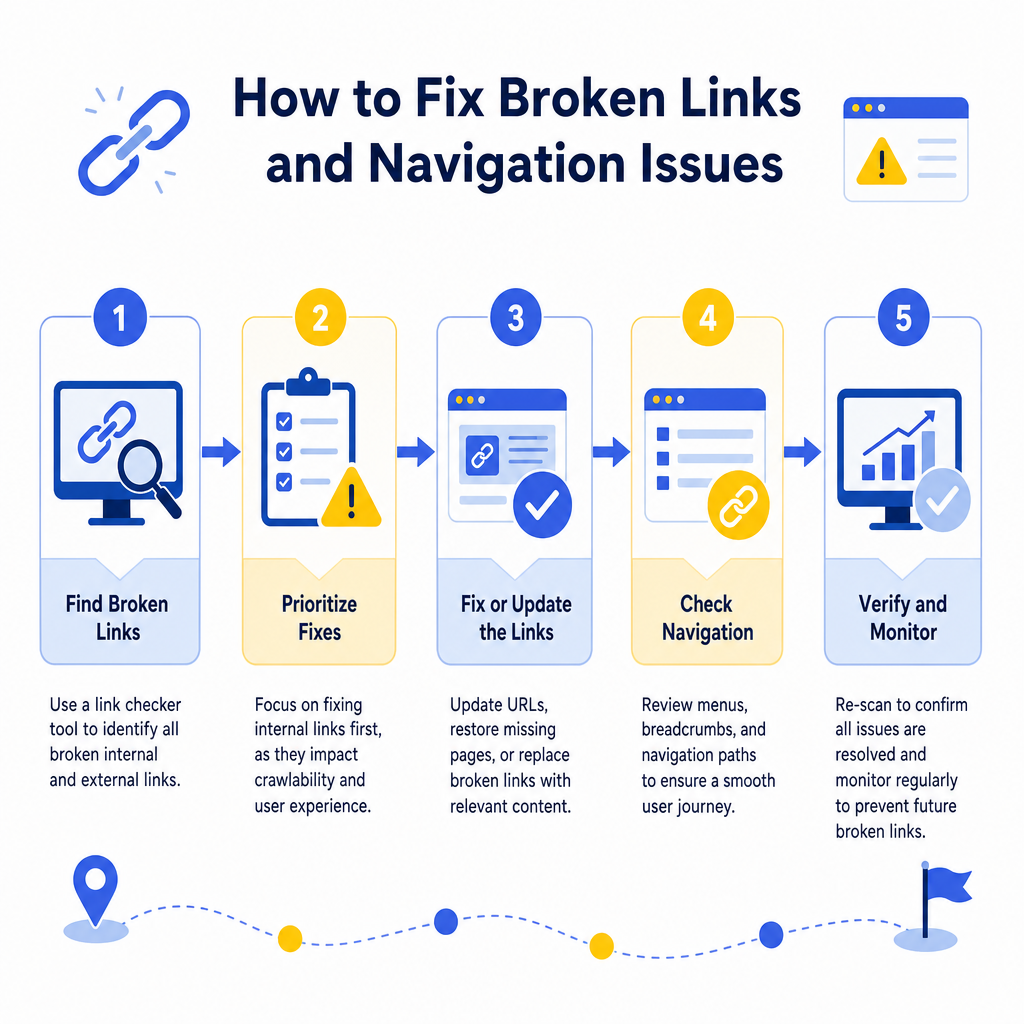
Broken links within documentation create dead ends that frustrate users and harm your SEO. Start by using a link checker tool to identify all broken internal and external links within your documentation. Prioritize fixing internal links first, as these directly impact your site's crawlability and user navigation.
For each broken internal link, determine whether the target page has been moved, deleted, or renamed. If the page still exists at a different URL, update the link accordingly. If the page has been permanently removed, either remove the link or replace it with a link to relevant alternative content.
External links require different handling since you can't control the destination sites. When external links break, research whether the content has moved to a new location. If you can't find the updated URL, consider linking to archived versions using the Wayback Machine or finding alternative authoritative sources that cover the same information.
Don't forget to implement proper redirect strategies for any documentation URLs that have changed. Understanding content optimization principles can help you ensure your redirected pages maintain their SEO value while providing users with seamless navigation experiences.
What's the Best Way to Update Outdated Information?
Outdated documentation can be worse than no documentation at all, as it actively misleads users and damages trust in your brand. Establish a regular review schedule for all documentation, with high-traffic and critical pages reviewed monthly and less important content reviewed quarterly.
Create a standardized process for updating documentation that includes fact-checking, screenshot updates, and testing all described procedures. Assign ownership of different documentation sections to specific team members who understand the subject matter deeply. This ensures updates are accurate and comprehensive rather than superficial.
When updating content, don't just fix obvious errors. Look for opportunities to enhance the information based on common user questions, support tickets, and feedback. Add clarifying details, additional examples, or troubleshooting steps that address real user pain points. This approach transforms basic fixes into valuable content improvements that can boost your search rankings.
How to Maintain Content Freshness Signals
Search engines favor content that stays current and relevant. Add publication and last-updated dates to your documentation pages, and ensure these dates reflect when substantial updates occur, not just minor edits. Consider adding version numbers to technical documentation to help users understand which information applies to their situation.
Implement structured data markup for your documentation to help search engines understand the content type and freshness signals. This can improve how your documentation appears in search results and increase click-through rates.
How to Improve Documentation Structure and User Experience
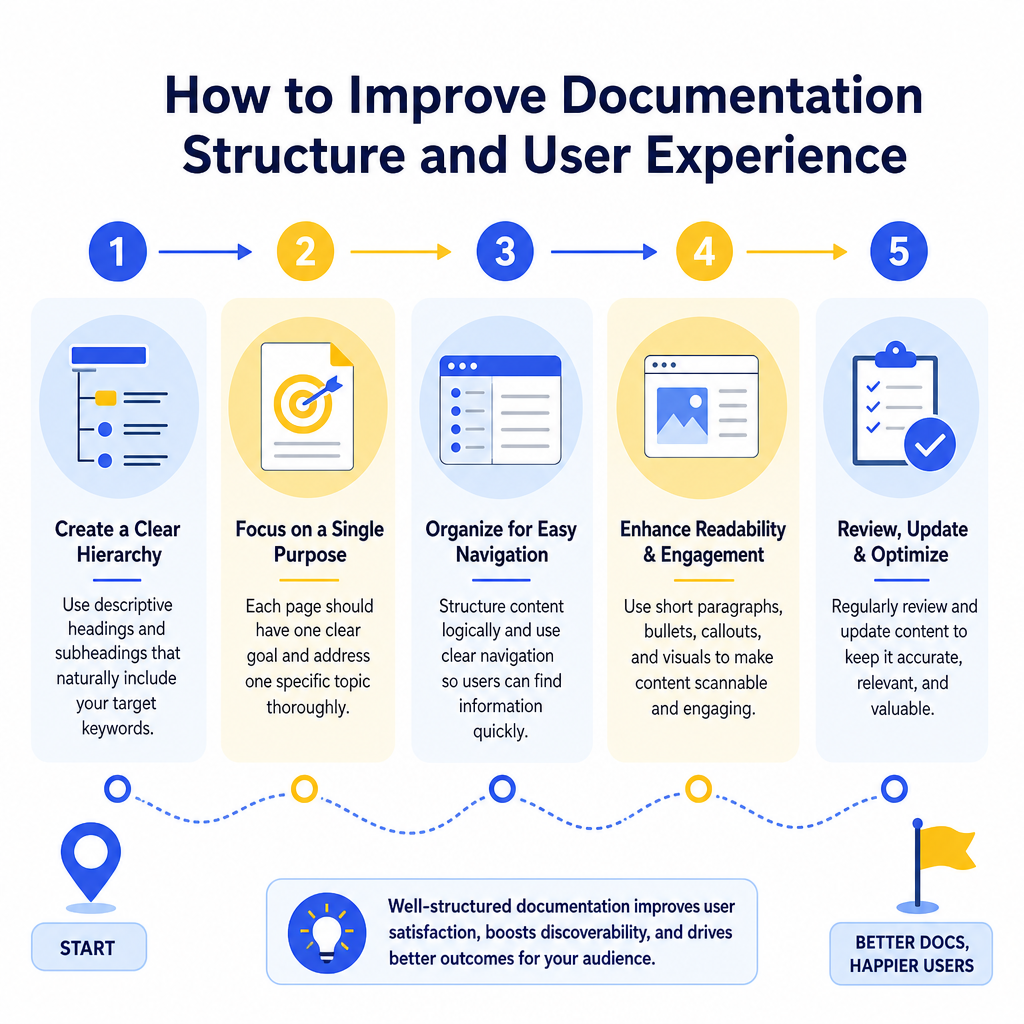
Well-structured documentation helps both users and search engines understand and navigate your content effectively. Start by implementing a clear hierarchy with descriptive headings that use your target keywords naturally. Each documentation page should have a single, focused purpose that's immediately clear from the title and introduction.
Use progressive disclosure techniques to present information in digestible chunks. Start with overview information and basic steps, then provide detailed explanations and advanced options. This approach serves both beginners who need simple guidance and experienced users who want comprehensive details.
Implement effective internal linking strategies within your documentation. Link related articles, prerequisite information, and follow-up resources using descriptive anchor text. This creates a web of interconnected content that keeps users engaged and helps search engines understand the relationships between different pieces of documentation.
Consider how SEO blog post structures can inform your documentation format, particularly for longer guides and tutorials that need to balance comprehensive information with readability.
What Role Does Search Intent Play in Documentation Fixes?
Understanding search intent is crucial for creating documentation that ranks well and satisfies user needs. Analyze the keywords people use to find your documentation and ensure your content directly addresses those search queries. Use tools like Answer The Public or Google's "People Also Ask" feature to identify common questions related to your documentation topics.
Different types of documentation serve different search intents. Troubleshooting guides address problem-solving intent, while feature explanations serve informational intent. Tutorial content satisfies learning intent, and comparison guides help with decision-making intent. Align your documentation format and content depth with the primary intent of your target audience.
Optimize your documentation titles and meta descriptions to clearly communicate what users will accomplish or learn. Use action-oriented language that matches the searcher's goal, such as "How to Fix," "Complete Guide to," or "Step-by-Step Instructions for."
How to Measure Documentation Fix Success
Establish clear metrics to track the effectiveness of your documentation improvements. Monitor changes in organic search traffic, search rankings for target keywords, and user engagement metrics like time on page and bounce rate. Set up Google Analytics goals to track successful completion of documented processes.
Pay attention to indirect metrics that indicate improved documentation quality. These include reduced support ticket volume, decreased use of site search, and improved user satisfaction scores. Many companies find that fixing documentation problems leads to measurable reductions in customer support costs.
Track the performance of specific documentation pages over time using tools like Google Search Console and analytics platforms. Look for improvements in click-through rates from search results, which indicate that your titles and descriptions better match user expectations. Monitor featured snippet opportunities, as well-structured documentation often earns these valuable search result features.
Regular monitoring helps you identify new issues before they become serious problems. Set up automated alerts for broken links, significant traffic drops, or increases in bounce rates that might indicate new documentation problems.
Conclusion
Fixing documentation issues requires a systematic approach that addresses technical problems, content quality, and user experience simultaneously. By conducting thorough audits, implementing structured improvement processes, and continuously monitoring performance, you can transform problematic documentation into a powerful SEO asset that drives traffic and conversions.
Remember that documentation fixes aren't one-time projects but ongoing maintenance activities. Establish regular review schedules, assign clear ownership responsibilities, and create processes that prevent problems from recurring. The investment in proper documentation maintenance pays dividends through improved search rankings, reduced support costs, and enhanced user satisfaction.
Ready to transform your documentation into an SEO powerhouse? Start with a comprehensive audit of your highest-traffic documentation pages and implement the strategies outlined in this guide. Your users and search rankings will thank you for the improved experience.

Stefan Winter
Founder & SEO Expert
Founder of Fast SEO Fix and SEO automation expert. Stefan built Fast SEO Fix to solve the tedious problem of manual SEO work. He specializes in SEO optimized content generation, keyword research, and automated SEO strategies.
