Why Is Keyword Research for YouTube Different from Traditional SEO?
Posted by
 Stefan Winter
How to Master Keyword Research for YouTube and Boost Your Channel's Visibility
YouTube has evolved far beyond a simple video-sharing platform. With over 2 billion monthly active users, it's now the world's second-largest search engine, making keyword research for YouTube an essential skill for content creators who want to grow their channels. Whether you're launching a new channel or looking to revitalize existing content, understanding how to find and leverage the right keywords can dramatically increase your video's discoverability and audience reach.
This comprehensive guide will walk you through the entire process of conducting effective keyword research specifically for YouTube, from understanding the platform's unique search algorithm to implementing advanced strategies that can set your content apart from millions of competing videos.
Why Is Keyword Research for YouTube Different from Traditional SEO?
YouTube operates on its own distinct algorithm that prioritizes different ranking factors compared to Google's web search. While traditional keyword research and SEO strategies focus on website optimization, YouTube keyword research requires understanding video-specific metrics like watch time, engagement rates, and click-through rates on thumbnails.
The platform's search functionality considers not just the keywords in your title and description, but also factors like video retention, comments, likes, and subscriber growth following video views. This means your keyword strategy must align with content that genuinely engages viewers, not just attracts initial clicks.
YouTube's autocomplete feature also provides unique insights into what users are actively searching for on the platform. Unlike web searches, YouTube queries often include phrases like "how to," "tutorial," "review," or "vs," indicating users' intent to consume video content rather than read articles.
What Tools Should You Use for YouTube Keyword Research?
Free YouTube Keyword Research Tools
YouTube's own search bar serves as your primary research tool. Start typing your main topic and observe the autocomplete suggestions that appear. These suggestions represent real searches that users perform frequently on the platform.
YouTube Analytics provides invaluable data about how viewers find your existing videos. Navigate to the "Reach" tab to see which search terms are driving traffic to your content. This information helps you understand what's already working and identify opportunities for similar content.
Google Trends offers a YouTube-specific filter that shows search volume trends exclusively for the platform. This tool helps you identify seasonal trends and compare the popularity of different keyword variations over time.
Premium Tools Worth Considering
TubeBuddy and VidIQ are browser extensions specifically designed for YouTube creators. These tools provide keyword difficulty scores, search volume estimates, and competitive analysis features. According to YouTube's Creator Academy, successful creators often use data-driven approaches to content planning, making these tools valuable investments.
Ahrefs Keywords Explorer includes YouTube search volume data and can help you identify keywords that perform well across both Google and YouTube. This dual-platform insight is particularly valuable for creators who want to maximize their content's reach across multiple search engines.
| Tool Type | Best For | Key Features | Cost |
|---|---|---|---|
| YouTube Search Bar | Quick research | Real autocomplete data | Free |
| YouTube Analytics | Existing content analysis | Traffic source insights | Free |
| TubeBuddy | Comprehensive optimization | Keyword scores, tags | Freemium |
| VidIQ | Competitor analysis | Trending insights | Freemium |
| Ahrefs | Cross-platform research | Search volume data | Premium |
How Do You Identify High-Opportunity Keywords for Your Niche?
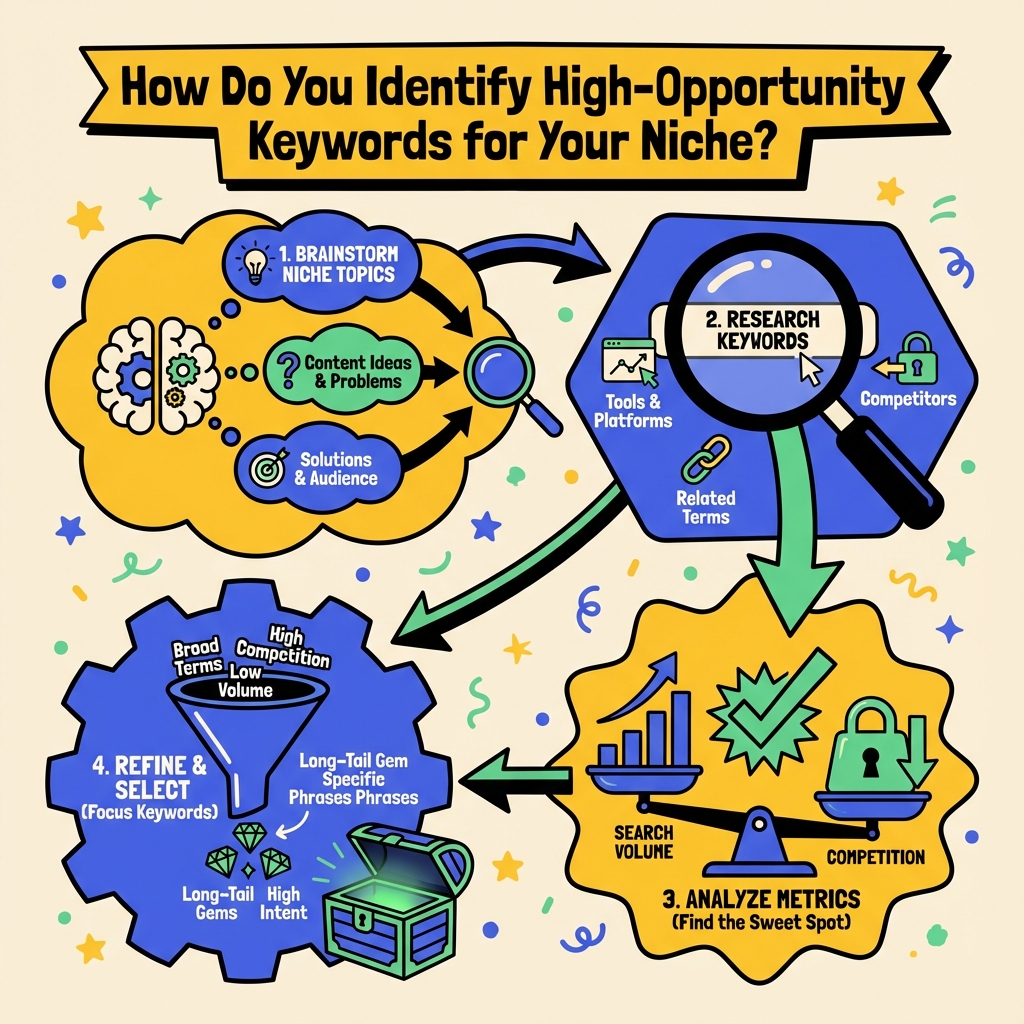
Step 1: Define Your Content Categories
Begin by listing 5-10 broad topics that align with your channel's focus. If you run a fitness channel, your categories might include "home workouts," "nutrition tips," "weight loss," and "muscle building." These categories serve as your starting points for deeper keyword exploration.
Step 2: Analyze Your Top Competitors
Identify 3-5 successful channels in your niche and examine their most popular videos from the past six months. Look for patterns in their titles, descriptions, and tags. Pay attention to videos with high view counts relative to the channel's subscriber base, as these often indicate successful keyword targeting.
Study the comment sections of these popular videos to understand what questions viewers are asking. These questions often reveal long-tail keyword opportunities that you can address in your own content.
Step 3: Explore Long-Tail Variations
Long-tail keywords typically face less competition and attract more targeted viewers. Instead of targeting "workout," consider "15-minute morning workout for beginners" or "no equipment workout for small apartments." These specific phrases help you connect with viewers who have precise needs and are more likely to engage with your content.
Use YouTube's search filters to understand how users refine their searches. Apply filters for upload date, duration, and view count to see what types of content perform well for your target keywords.
What's the Best Strategy for Implementing Keywords in Your Videos?
Optimizing Video Titles
Your title should include your primary keyword near the beginning while remaining compelling and clickable. Aim for titles between 60-70 characters to ensure they display fully in search results. Consider emotional triggers and power words that encourage clicks while accurately representing your content.
Test different title variations using YouTube's A/B testing features if you're eligible, or create similar content with different title approaches to see what resonates with your audience.
Crafting Effective Descriptions
Your video description should expand on your title's keyword theme within the first 125 characters, as this text appears in search results. Include 2-3 related keywords naturally throughout the description, focusing on providing genuine value to viewers rather than keyword stuffing.
Link to related content on your channel and include timestamps for longer videos. These elements improve user experience and can indirectly boost your search rankings by increasing engagement metrics.
Strategic Tag Implementation
Use 10-15 relevant tags that include your primary keyword, related terms, and broader category tags. Start with specific tags and gradually broaden to more general terms. Include common misspellings if they're relevant to your topic.
Research shows that tags have less direct impact on rankings than titles and descriptions, but they help YouTube understand your content's context and can improve discoverability in suggested video feeds.
How Can You Track and Improve Your Keyword Performance?
Monitoring Key Metrics
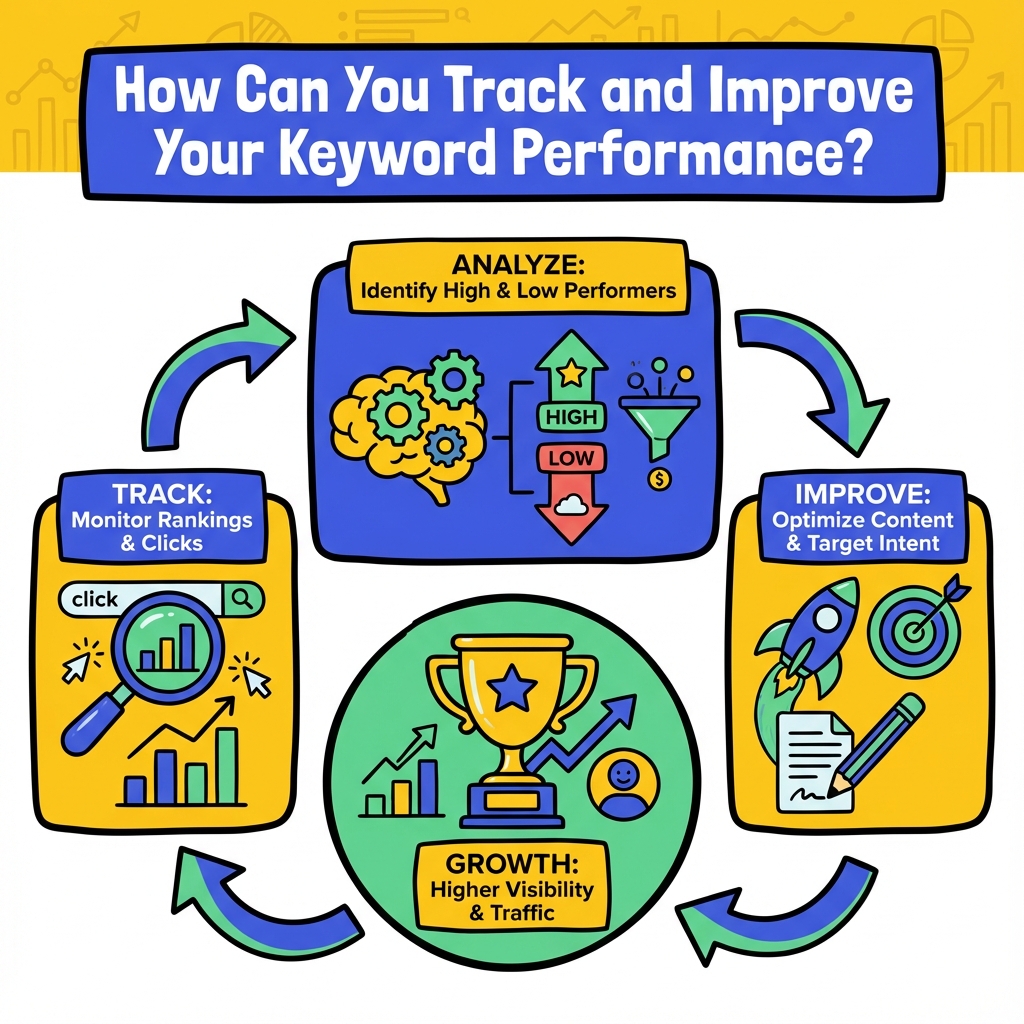
YouTube Analytics provides detailed insights into how your keyword optimization efforts are performing. Focus on impressions (how often your video appears in search results), click-through rate (percentage of people who click after seeing your video), and average view duration.
Track your rankings for target keywords using tools like TubeBuddy or by manually checking search results in incognito mode. Document your positions weekly to identify trends and opportunities for improvement.
Iterating Based on Performance Data
Review your top-performing videos monthly to identify successful keyword patterns. Look for commonalities in titles, descriptions, and topics that generate the most organic traffic and engagement.
Don't be afraid to update older videos with improved keyword optimization. YouTube allows you to edit titles, descriptions, and tags after publication, giving you opportunities to improve underperforming content based on new keyword insights.
What Common Mistakes Should You Avoid in YouTube Keyword Research?
Keyword Stuffing and Over-Optimization
Cramming too many keywords into your titles and descriptions can harm both user experience and search performance. YouTube's algorithm prioritizes content that provides genuine value to viewers, so focus on creating natural, readable text that incorporates keywords contextually.
Ignoring Search Intent
Understanding why people search for specific terms is crucial for creating content that satisfies their needs. Someone searching "iPhone review" wants different information than someone searching "iPhone unboxing" or "iPhone tutorial." Align your content format and style with the search intent behind your target keywords.
Neglecting Mobile Optimization
Over 70% of YouTube watch time occurs on mobile devices, according to Google's official statistics. Ensure your titles are compelling when truncated on smaller screens, and consider how your thumbnails appear on mobile devices when planning your keyword strategy.
Advanced Techniques for Competitive Keyword Research
Seasonal Trend Analysis
Use Google Trends to identify seasonal patterns in your niche. Plan content calendars around predictable spikes in search volume, such as "holiday recipes" in November or "workout routines" in January. Creating content 2-3 weeks before peak search periods can help you capture early momentum.
Cross-Platform Keyword Validation
Research how your target keywords perform on Google's web search to identify opportunities for cross-platform content promotion. Keywords that perform well on both platforms can justify creating comprehensive content strategies that include both video and blog post components.
Community-Driven Keyword Discovery
Monitor Reddit communities, Facebook groups, and Discord servers related to your niche. These platforms often reveal emerging trends and specific language that your target audience uses before these terms become popular in mainstream search tools.
Conclusion
Mastering keyword research for YouTube requires a strategic approach that balances search optimization with genuine audience value. By understanding the platform's unique algorithm, utilizing both free and premium research tools, and continuously monitoring your performance metrics, you can significantly improve your video's discoverability and channel growth.
Remember that successful YouTube keyword research is an ongoing process, not a one-time task. As your channel evolves and your audience grows, your keyword strategy should adapt to reflect new opportunities and changing viewer interests. Start implementing these techniques with your next video upload, and track your results to refine your approach over time.
Ready to take your YouTube channel to the next level? Begin with thorough keyword research for your next video, and watch as improved discoverability translates into sustainable channel growth and audience engagement.

Stefan Winter
Founder & SEO Expert
Founder of Fast SEO Fix and SEO automation expert. Stefan built Fast SEO Fix to solve the tedious problem of manual SEO work. He specializes in SEO optimized content generation, keyword research, and automated SEO strategies.
